VUGen Pacing Interations
Pacing
Pacing is, as its name suggests, a method to pace your requests. You do this so you can accurately achieve a desired load against your system instead of just mindlessly hammering it.
Pacing is the time that the vuser waits for between iterations.
Pacing is particularly useful in controlling the number of iterations in a specified time.
Let us suppose, we know that to complete an iteration a vuer takes an avg. time of v sec and the test requirement says that a vuser should complete only 10 iterations in an hour.
So in above case, the vuser should iterate once in minimum 360 sec. if v is less than 360, pacing is added to adjust iteration time.
So pacing (p) is selected such that v+p = 360. In this way the vuser will roughly iterate 10 times in an hour.
Why Use Pacing?
Without pacing you will never know if the problems you find are really problems or not. You could waste everyone's time tuning a system to handle a billion hits per second when in reality when it went live it only needed to able to handle 5 and it could have done that from the start.
Pacing Setting
Pacing can be set tin the run time settings for the script. To view run time settings press F4 key or go to Vuser -> Run-Time Settings and then select Pacing under General
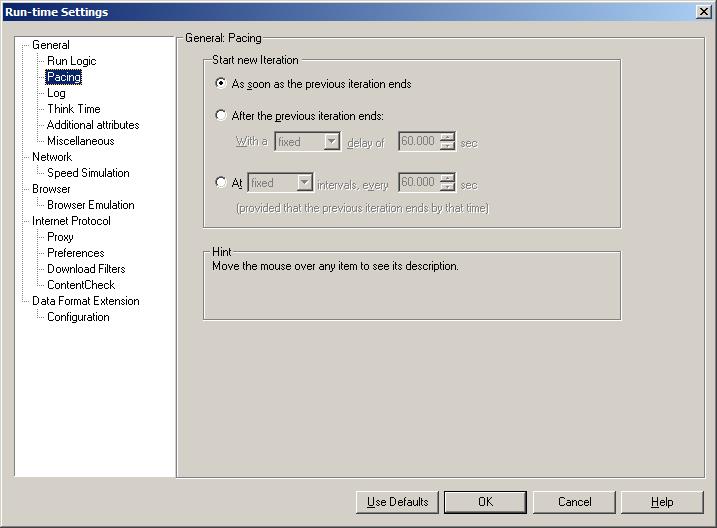
Different Pacing Options
- As soon as the previous iteration ends.
- After the previous iteration ends.
- At intervals.
As soon as the previous iteration ends:
With this option the vuser does not wait after an iteration, it immediately starts the next iteration.
After the previous iteration ends:
This option allows you to select fixed/random delay. Minimum delay (in seconds) is 0 and the maximum delay is 32000.
With this option the vuser will always wait for the specified time before beginning the next iteration.
We can introduce a random or fixed delay, by selecting the value form the dropdown shown below.
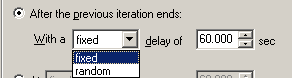
If fixed is chosen, a fixed time should be specified. If random is chosen, a range should be specified and value within the specified range will be selected as the pacing.
At Intervals:
In this option an interval is set and this interval starts when the vuser starts the iteration. If the vuser iterates within the specified interval then the it waits for the remaining time until the interval is over.
For instance, if the interval is set to 60 sec and the vuser iterates in 40 sec then the remaining time becomes the pacing i.e. the vuser has to wait for 20 sec before starting the next iteration.
If the Vuser surpasses the specified interval, let us say it takes 65 sec then it proceeds to next iteration without waiting. In such a case the log displays a message that says “Iteration pacing cannot be reached (pace time = 60.00, actual time = 65.00).”
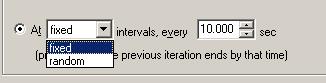
We can set a fixed or random interval, by selecting the value from the dropdown below.
|About Load Runner |Creating scripts in Load Runner |Load Runner scenario |LR Analysis |Performance Tuning |Performance Testing |LR Errors |Interview Question |Load Runner Tool |Correlation Practice |Site Map |